Request failed with status code 401 AxiosError: Request failed with status code 401

2023-10-20 11:40

本文主要是介绍Request failed with status code 401 AxiosError: Request failed with status code 401,希望对大家解决编程问题提供一定的参考价值,需要的开发者们随着小编来一起学习吧!

发送请求时出现error:Request failed with status code 401
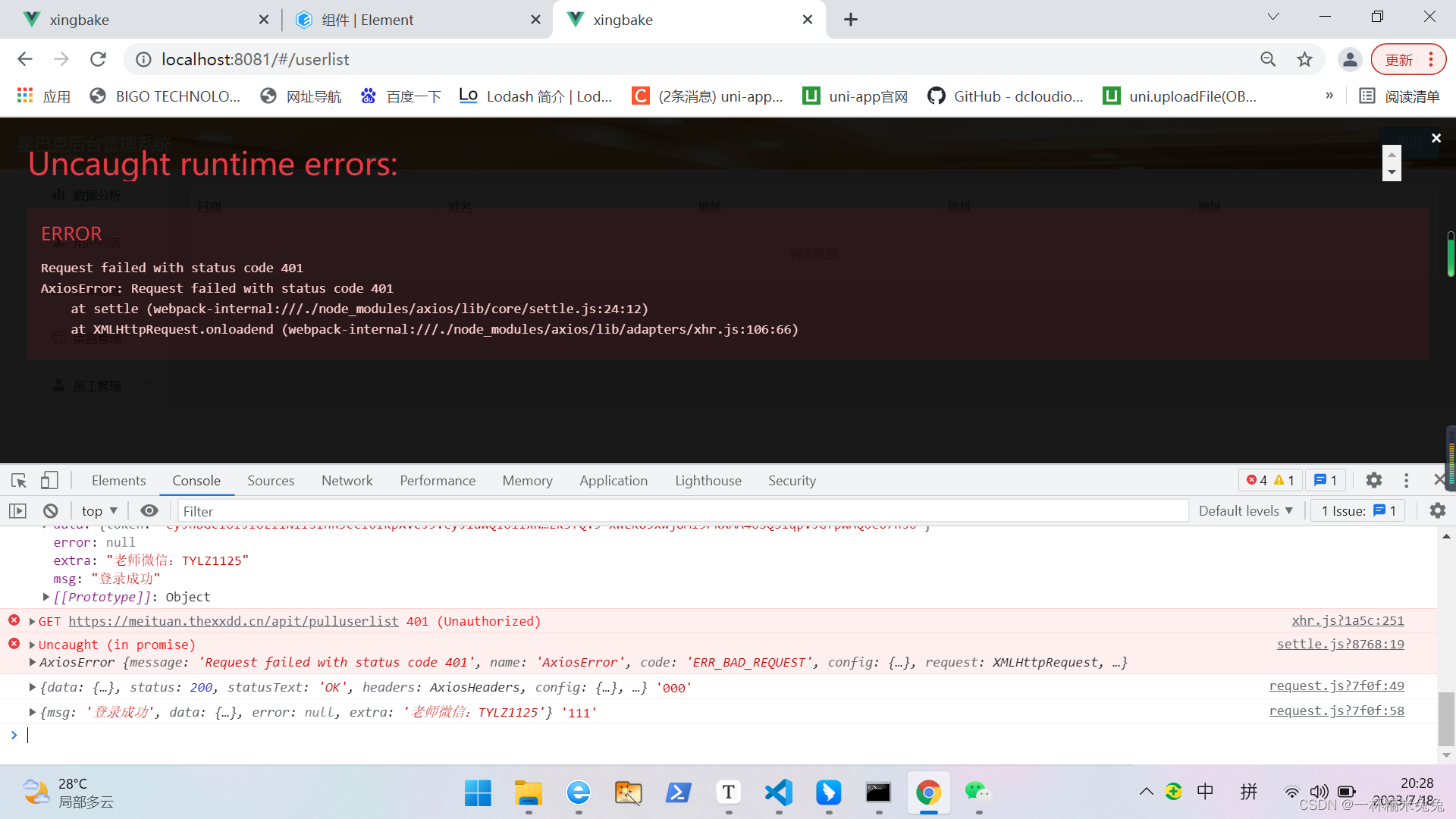
 401考虑到token问题和token编译问题

查看请求拦截代码,没问题

request.interceptors.request.use(config=>{const token = getEToke()if(token){config.headers.Authorization = token}startLoading()return config}

再查看编译token的getEToke():

错误示例:

function getEToke(){const token = getToken()const base64_token = Base64.encode(token + ':')return "Basic" + base64_token
}

发现"Basic"中没加空格

正确示例:
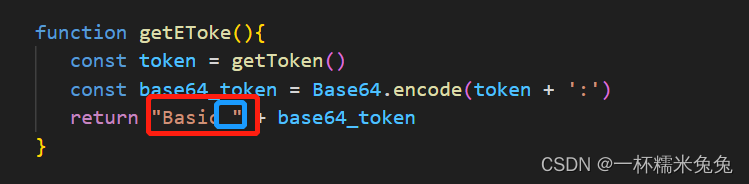
function getEToke(){const token = getToken()const base64_token = Base64.encode(token + ':')return "Basic " + base64_token
}

 结果:可以正常发送请求

"Basic ""Basic ""Basic ""Basic ""Basic "

这篇关于Request failed with status code 401 AxiosError: Request failed with status code 401的文章就介绍到这儿,希望我们推荐的文章对编程师们有所帮助!



http://www.chinasem.cn/article/246868

相关文章

Python中Request的安装以及简单的使用方法图文教程

《Python中Request的安装以及简单的使用方法图文教程》python里的request库经常被用于进行网络爬虫,想要学习网络爬虫的同学必须得安装request这个第三方库,:本文主要介绍P... 目录1.Requests 安装cmd 窗口安装为pycharm安装在pycharm设置中为项目安装req

前端Visual Studio Code安装配置教程之下载、汉化、常用组件及基本操作

《前端VisualStudioCode安装配置教程之下载、汉化、常用组件及基本操作》VisualStudioCode是微软推出的一个强大的代码编辑器,功能强大,操作简单便捷,还有着良好的用户界面,... 目录一、Visual Studio Code下载二、汉化三、常用组件1、Auto Rename Tag2

VS Code中的Python代码格式化插件示例讲解

《VSCode中的Python代码格式化插件示例讲解》在Java开发过程中,代码的规范性和可读性至关重要,一个团队中如果每个开发者的代码风格各异,会给代码的维护、审查和协作带来极大的困难,这篇文章主... 目录前言如何安装与配置使用建议与技巧如何选择总结前言在 VS Code 中,有几款非常出色的 pyt

解决Nginx启动报错Job for nginx.service failed because the control process exited with error code问题

《解决Nginx启动报错Jobfornginx.servicefailedbecausethecontrolprocessexitedwitherrorcode问题》Nginx启... 目录一、报错如下二、解决原因三、解决方式总结一、报错如下Job for nginx.service failed bec

解决Failed to get nested archive for entry BOOT-INF/lib/xxx.jar问题

《解决FailedtogetnestedarchiveforentryBOOT-INF/lib/xxx.jar问题》解决BOOT-INF/lib/xxx.jar替换异常需确保路径正确:解... 目录Failed to get nested archive for entry BOOT-INF/lib/xxx

SpringBoot排查和解决JSON解析错误(400 Bad Request)的方法

《SpringBoot排查和解决JSON解析错误(400BadRequest)的方法》在开发SpringBootRESTfulAPI时,客户端与服务端的数据交互通常使用JSON格式,然而,JSON... 目录问题背景1. 问题描述2. 错误分析解决方案1. 手动重新输入jsON2. 使用工具清理JSON3.

解决Maven项目报错:failed to execute goal org.apache.maven.plugins:maven-compiler-plugin:3.13.0的问题

《解决Maven项目报错:failedtoexecutegoalorg.apache.maven.plugins:maven-compiler-plugin:3.13.0的问题》这篇文章主要介... 目录Maven项目报错:failed to execute goal org.apache.maven.pl

解决SpringBoot启动报错:Failed to load property source from location 'classpath:/application.yml'

《解决SpringBoot启动报错:Failedtoloadpropertysourcefromlocationclasspath:/application.yml问题》这篇文章主要介绍... 目录在启动SpringBoot项目时报如下错误原因可能是1.yml中语法错误2.yml文件格式是GBK总结在启动S

MySQL 中的服务器配置和状态详解(MySQL Server Configuration and Status)

《MySQL中的服务器配置和状态详解(MySQLServerConfigurationandStatus)》MySQL服务器配置和状态设置包括服务器选项、系统变量和状态变量三个方面,可以通过... 目录mysql 之服务器配置和状态1 MySQL 架构和性能优化1.1 服务器配置和状态1.1.1 服务器选项

Debugging Lua Project created in Cocos Code IDE creates “Waiting for debugger to connect” in Win-7

转自 I Installed Cocos Code IDE and created a new Lua Project. When Debugging the Project(F11) the game window pops up and gives me the message waiting for debugger to connect and then freezes. Also a
