本文主要是介绍【Unity3D编辑器开发】Unity3D中实现查看键盘对应KeyCode值面板【方便开发】,希望对大家解决编程问题提供一定的参考价值,需要的开发者们随着小编来一起学习吧!
推荐阅读
- CSDN主页
- GitHub开源地址
- Unity3D插件分享
- 简书地址
- 我的个人博客
大家好,我是佛系工程师☆恬静的小魔龙☆,不定时更新Unity开发技巧,觉得有用记得一键三连哦。
一、前言
在开发中,会遇到要使用监控键盘输入的KeyCode值来执行代码的情况。
比如说:
using System;
using UnityEditor;
using UnityEngine;public class Test01 : MonoBehaviour
{void Update(){if (Input.GetKeyDown(KeyCode.W)){Debug.Log("点击了键盘W");}}
}
但是,如果是一些不常用的键位,比如说{}[],这些KeyCode值就比较难查看了,因为API是这样的:
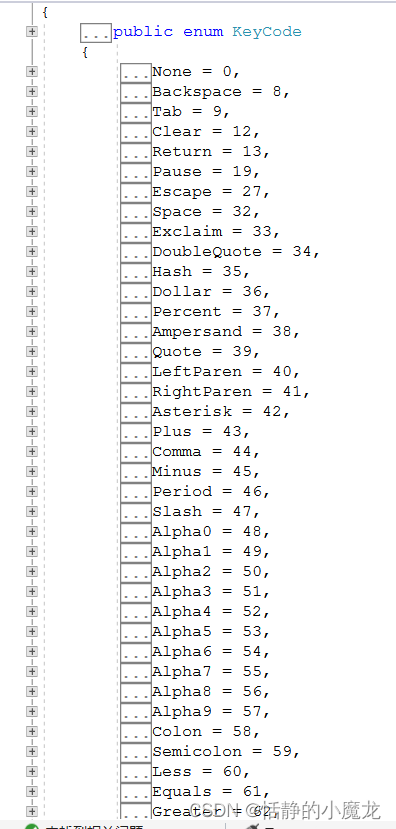
根本不知道这英文还是数字代表了啥,于是就诞生了,在Unity做一个键盘,然后在键盘的键位下标注每个键位的KeyCode值,方便开发。
先看下效果图:
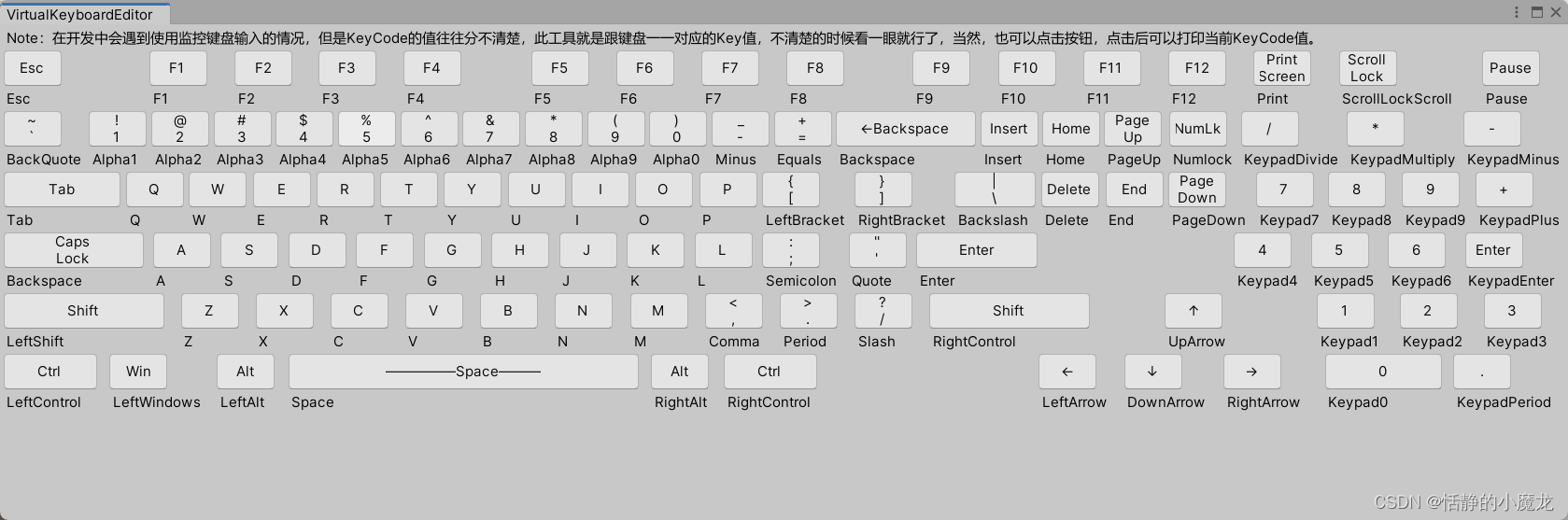
小明:键位没有对齐,逼死强迫症啊喂!
张三:不重要!不重要!
二、正文
2-1、构建键盘键值表
让我们新建一个脚本,命名为VirtualKeyboardEditor.cs名字无所谓,主要是要继承与EditorWindow类,并且把脚本放到Editor文件夹内。
编辑代码:
using System.Collections;
using System.Collections.Generic;
using UnityEditor;
using UnityEngine;public class VirtualKeyboardEditor : EditorWindow
{[MenuItem("工具/键盘映射值")]static void OpenWindow(){GetWindow<VirtualKeyboardEditor>().Show();}//用于绘制窗口内容private void OnGUI(){}
}
然后,我们需要写一个自定义类,用来保存键盘值名和KeyCode值,以及长宽。
// 键盘映射value值
public class VirKeyValue
{public float height;public float width;public string name;public string key;public VirKeyValue(string name, string key, float width, float height){this.name = name;this.width = width;this.height = height;this.key = key;}
}
接着构建键值库:
static Dictionary<int, List<VirKeyValue>> dicVirKeys;const int width1 = 50;const int width2 = 80;const int width100 = 100;const int width120 = 120;const int width140 = 138;const int width3 = 300;const int height1 = 30;private void DataInit(){if (dicVirKeys == null){dicVirKeys = new Dictionary<int, List<VirKeyValue>>();List<VirKeyValue> tempVirKeys = new List<VirKeyValue>{new VirKeyValue("Esc","Esc", width1, height1),new VirKeyValue("F1","F1", width1, height1),new VirKeyValue("F2","F2", width1, height1),new VirKeyValue("F3","F3", width1, height1),new VirKeyValue("F4","F4", width1, height1),new VirKeyValue("F5","F5", width1, height1),new VirKeyValue("F6","F6", width1, height1),new VirKeyValue("F7","F7", width1, height1),new VirKeyValue("F8","F8", width1, height1),new VirKeyValue("F9","F9", width1, height1),new VirKeyValue("F10","F10", width1, height1),new VirKeyValue("F11","F11", width1, height1),new VirKeyValue("F12","F12", width1, height1),new VirKeyValue("Print\nScreen","Print", width1, height1),new VirKeyValue("Scroll\nLock", "ScrollLockScroll",width1, height1),new VirKeyValue("Pause","Pause", width1, height1)};dicVirKeys.Add(0, tempVirKeys);tempVirKeys = new List<VirKeyValue>{new VirKeyValue("~\n`","BackQuote", width1, height1),new VirKeyValue("!\n1","Alpha1", width1, height1),new VirKeyValue("@\n2","Alpha2", width1, height1),new VirKeyValue("#\n3","Alpha3", width1, height1),new VirKeyValue("$\n4","Alpha4", width1, height1),new VirKeyValue("%\n5","Alpha5", width1, height1),new VirKeyValue("^\n6","Alpha6", width1, height1),new VirKeyValue("&\n7","Alpha7", width1, height1),new VirKeyValue("*\n8","Alpha8", width1, height1),new VirKeyValue("(\n9","Alpha9", width1, height1),new VirKeyValue(")\n0","Alpha0", width1, height1),new VirKeyValue("_\n-","Minus", width1, height1),new VirKeyValue("+\n=","Equals", width1, height1),new VirKeyValue("←Backspace","Backspace", width120, height1),new VirKeyValue("Insert","Insert", width1, height1),new VirKeyValue("Home", "Home",width1, height1),new VirKeyValue("Page\nUp", "PageUp",width1, height1),new VirKeyValue("NumLk","Numlock", width1, height1),new VirKeyValue("/","KeypadDivide", width1, height1),new VirKeyValue("*","KeypadMultiply", width1, height1),new VirKeyValue("-","KeypadMinus", width1, height1),};dicVirKeys.Add(1, tempVirKeys);tempVirKeys = new List<VirKeyValue>{new VirKeyValue("Tab","Tab", width100, height1),new VirKeyValue("Q","Q",width1, height1),new VirKeyValue("W","W",width1, height1),new VirKeyValue("E","E",width1, height1),new VirKeyValue("R","R",width1, height1),new VirKeyValue("T","T",width1, height1),new VirKeyValue("Y","Y",width1, height1),new VirKeyValue("U","U",width1, height1),new VirKeyValue("I","I",width1, height1),new VirKeyValue("O","O",width1, height1),new VirKeyValue("P","P",width1, height1),new VirKeyValue("{\n[","LeftBracket", width1, height1),new VirKeyValue("}\n]","RightBracket", width1, height1),new VirKeyValue("|\n\\", "Backslash",70, height1),new VirKeyValue("Delete", "Delete",width1, height1),new VirKeyValue("End", "End",width1, height1),new VirKeyValue("Page\nDown","PageDown", width1, height1),new VirKeyValue("7","Keypad7",width1, height1),new VirKeyValue("8","Keypad8",width1, height1),new VirKeyValue("9","Keypad9",width1, height1),new VirKeyValue("+","KeypadPlus",width1, height1),};dicVirKeys.Add(2, tempVirKeys);tempVirKeys = new List<VirKeyValue>{new VirKeyValue("Caps\nLock","Backspace", width120, height1),new VirKeyValue("A","A", width1, height1),new VirKeyValue("S","S", width1, height1),new VirKeyValue("D","D", width1, height1),new VirKeyValue("F","F", width1, height1),new VirKeyValue("G","G", width1, height1),new VirKeyValue("H","H", width1, height1),new VirKeyValue("J","J", width1, height1),new VirKeyValue("K","K", width1, height1),new VirKeyValue("L","L", width1, height1),new VirKeyValue(":\n;","Semicolon", width1, height1),new VirKeyValue("\"\n'","Quote", width1, height1),new VirKeyValue("Enter","Enter", 104, height1),new VirKeyValue("4","Keypad4",width1, height1),new VirKeyValue("5","Keypad5",width1, height1),new VirKeyValue("6","Keypad6",width1, height1),new VirKeyValue("Enter","KeypadEnter", width1, height1),};dicVirKeys.Add(3, tempVirKeys);tempVirKeys = new List<VirKeyValue>{new VirKeyValue("Shift","LeftShift", width140, height1),new VirKeyValue("Z","Z",width1, height1),new VirKeyValue("X","X",width1, height1),new VirKeyValue("C","C",width1, height1),new VirKeyValue("V","V",width1, height1),new VirKeyValue("B","B",width1, height1),new VirKeyValue("N","N",width1, height1),new VirKeyValue("M","M",width1, height1),new VirKeyValue("<\n,","Comma", width1, height1),new VirKeyValue(">\n.","Period", width1, height1),new VirKeyValue("?\n/","Slash", width1, height1),new VirKeyValue("Shift","RightControl", width140, height1),new VirKeyValue("↑","UpArrow", width1, height1),new VirKeyValue("1","Keypad1", width1, height1),new VirKeyValue("2","Keypad2", width1, height1),new VirKeyValue("3","Keypad3", width1, height1),};dicVirKeys.Add(4, tempVirKeys);tempVirKeys = new List<VirKeyValue>{new VirKeyValue("Ctrl","LeftControl", width2, height1),new VirKeyValue("Win", "LeftWindows",width1, height1),new VirKeyValue("Alt", "LeftAlt",width1, height1),new VirKeyValue("—————Space———","Space", width3, height1),new VirKeyValue("Alt", "RightAlt",width1, height1),new VirKeyValue("Ctrl", "RightControl",width2, height1),new VirKeyValue("←","LeftArrow",width1, height1),new VirKeyValue("↓","DownArrow",width1, height1),new VirKeyValue("→","RightArrow",width1, height1),new VirKeyValue("0","Keypad0",width100, height1),new VirKeyValue(".","KeypadPeriod",width1, height1),};dicVirKeys.Add(5, tempVirKeys);}}
整体代码如下:
using System.Collections;
using System.Collections.Generic;
using UnityEditor;
using UnityEngine;// 键盘映射value值
public class VirKeyValue
{public float height;public float width;public string name;public string key;public VirKeyValue(string name, string key, float width, float height){this.name = name;this.width = width;this.height = height;this.key = key;}
}
public class VirtualKeyboardEditor : EditorWindow
{[MenuItem("工具/键盘映射值")]static void OpenWindow(){GetWindow<VirtualKeyboardEditor>().Show();}static Dictionary<int, List<VirKeyValue>> dicVirKeys;const int width1 = 50;const int width2 = 80;const int width100 = 100;const int width120 = 120;const int width140 = 138;const int width3 = 300;const int height1 = 30;private void DataInit(){if (dicVirKeys == null){dicVirKeys = new Dictionary<int, List<VirKeyValue>>();List<VirKeyValue> tempVirKeys = new List<VirKeyValue>{new VirKeyValue("Esc","Esc", width1, height1),new VirKeyValue("F1","F1", width1, height1),new VirKeyValue("F2","F2", width1, height1),new VirKeyValue("F3","F3", width1, height1),new VirKeyValue("F4","F4", width1, height1),new VirKeyValue("F5","F5", width1, height1),new VirKeyValue("F6","F6", width1, height1),new VirKeyValue("F7","F7", width1, height1),new VirKeyValue("F8","F8", width1, height1),new VirKeyValue("F9","F9", width1, height1),new VirKeyValue("F10","F10", width1, height1),new VirKeyValue("F11","F11", width1, height1),new VirKeyValue("F12","F12", width1, height1),new VirKeyValue("Print\nScreen","Print", width1, height1),new VirKeyValue("Scroll\nLock", "ScrollLockScroll",width1, height1),new VirKeyValue("Pause","Pause", width1, height1)};dicVirKeys.Add(0, tempVirKeys);tempVirKeys = new List<VirKeyValue>{new VirKeyValue("~\n`","BackQuote", width1, height1),new VirKeyValue("!\n1","Alpha1", width1, height1),new VirKeyValue("@\n2","Alpha2", width1, height1),new VirKeyValue("#\n3","Alpha3", width1, height1),new VirKeyValue("$\n4","Alpha4", width1, height1),new VirKeyValue("%\n5","Alpha5", width1, height1),new VirKeyValue("^\n6","Alpha6", width1, height1),new VirKeyValue("&\n7","Alpha7", width1, height1),new VirKeyValue("*\n8","Alpha8", width1, height1),new VirKeyValue("(\n9","Alpha9", width1, height1),new VirKeyValue(")\n0","Alpha0", width1, height1),new VirKeyValue("_\n-","Minus", width1, height1),new VirKeyValue("+\n=","Equals", width1, height1),new VirKeyValue("←Backspace","Backspace", width120, height1),new VirKeyValue("Insert","Insert", width1, height1),new VirKeyValue("Home", "Home",width1, height1),new VirKeyValue("Page\nUp", "PageUp",width1, height1),new VirKeyValue("NumLk","Numlock", width1, height1),new VirKeyValue("/","KeypadDivide", width1, height1),new VirKeyValue("*","KeypadMultiply", width1, height1),new VirKeyValue("-","KeypadMinus", width1, height1),};dicVirKeys.Add(1, tempVirKeys);tempVirKeys = new List<VirKeyValue>{new VirKeyValue("Tab","Tab", width100, height1),new VirKeyValue("Q","Q",width1, height1),new VirKeyValue("W","W",width1, height1),new VirKeyValue("E","E",width1, height1),new VirKeyValue("R","R",width1, height1),new VirKeyValue("T","T",width1, height1),new VirKeyValue("Y","Y",width1, height1),new VirKeyValue("U","U",width1, height1),new VirKeyValue("I","I",width1, height1),new VirKeyValue("O","O",width1, height1),new VirKeyValue("P","P",width1, height1),new VirKeyValue("{\n[","LeftBracket", width1, height1),new VirKeyValue("}\n]","RightBracket", width1, height1),new VirKeyValue("|\n\\", "Backslash",70, height1),new VirKeyValue("Delete", "Delete",width1, height1),new VirKeyValue("End", "End",width1, height1),new VirKeyValue("Page\nDown","PageDown", width1, height1),new VirKeyValue("7","Keypad7",width1, height1),new VirKeyValue("8","Keypad8",width1, height1),new VirKeyValue("9","Keypad9",width1, height1),new VirKeyValue("+","KeypadPlus",width1, height1),};dicVirKeys.Add(2, tempVirKeys);tempVirKeys = new List<VirKeyValue>{new VirKeyValue("Caps\nLock","Backspace", width120, height1),new VirKeyValue("A","A", width1, height1),new VirKeyValue("S","S", width1, height1),new VirKeyValue("D","D", width1, height1),new VirKeyValue("F","F", width1, height1),new VirKeyValue("G","G", width1, height1),new VirKeyValue("H","H", width1, height1),new VirKeyValue("J","J", width1, height1),new VirKeyValue("K","K", width1, height1),new VirKeyValue("L","L", width1, height1),new VirKeyValue(":\n;","Semicolon", width1, height1),new VirKeyValue("\"\n'","Quote", width1, height1),new VirKeyValue("Enter","Enter", 104, height1),new VirKeyValue("4","Keypad4",width1, height1),new VirKeyValue("5","Keypad5",width1, height1),new VirKeyValue("6","Keypad6",width1, height1),new VirKeyValue("Enter","KeypadEnter", width1, height1),};dicVirKeys.Add(3, tempVirKeys);tempVirKeys = new List<VirKeyValue>{new VirKeyValue("Shift","LeftShift", width140, height1),new VirKeyValue("Z","Z",width1, height1),new VirKeyValue("X","X",width1, height1),new VirKeyValue("C","C",width1, height1),new VirKeyValue("V","V",width1, height1),new VirKeyValue("B","B",width1, height1),new VirKeyValue("N","N",width1, height1),new VirKeyValue("M","M",width1, height1),new VirKeyValue("<\n,","Comma", width1, height1),new VirKeyValue(">\n.","Period", width1, height1),new VirKeyValue("?\n/","Slash", width1, height1),new VirKeyValue("Shift","RightControl", width140, height1),new VirKeyValue("↑","UpArrow", width1, height1),new VirKeyValue("1","Keypad1", width1, height1),new VirKeyValue("2","Keypad2", width1, height1),new VirKeyValue("3","Keypad3", width1, height1),};dicVirKeys.Add(4, tempVirKeys);tempVirKeys = new List<VirKeyValue>{new VirKeyValue("Ctrl","LeftControl", width2, height1),new VirKeyValue("Win", "LeftWindows",width1, height1),new VirKeyValue("Alt", "LeftAlt",width1, height1),new VirKeyValue("—————Space———","Space", width3, height1),new VirKeyValue("Alt", "RightAlt",width1, height1),new VirKeyValue("Ctrl", "RightControl",width2, height1),new VirKeyValue("←","LeftArrow",width1, height1),new VirKeyValue("↓","DownArrow",width1, height1),new VirKeyValue("→","RightArrow",width1, height1),new VirKeyValue("0","Keypad0",width100, height1),new VirKeyValue(".","KeypadPeriod",width1, height1),};dicVirKeys.Add(5, tempVirKeys);}}//用于绘制窗口内容private void OnGUI(){}
}
2-2、界面绘制
using System.Collections;
using System.Collections.Generic;
using UnityEditor;
using UnityEngine;// 键盘映射value值
public class VirKeyValue
{public float height;public float width;public string name;public string key;public VirKeyValue(string name, string key, float width, float height){this.name = name;this.width = width;this.height = height;this.key = key;}
}
public class VirtualKeyboardEditor : EditorWindow
{[MenuItem("工具/键盘映射值")]static void OpenWindow(){GetWindow<VirtualKeyboardEditor>().Show();}static Dictionary<int, List<VirKeyValue>> dicVirKeys;const int width1 = 50;const int width2 = 80;const int width100 = 100;const int width120 = 120;const int width140 = 138;const int width3 = 300;const int height1 = 30;private void DataInit(){if (dicVirKeys == null){dicVirKeys = new Dictionary<int, List<VirKeyValue>>();List<VirKeyValue> tempVirKeys = new List<VirKeyValue>{new VirKeyValue("Esc","Esc", width1, height1),new VirKeyValue("F1","F1", width1, height1),new VirKeyValue("F2","F2", width1, height1),new VirKeyValue("F3","F3", width1, height1),new VirKeyValue("F4","F4", width1, height1),new VirKeyValue("F5","F5", width1, height1),new VirKeyValue("F6","F6", width1, height1),new VirKeyValue("F7","F7", width1, height1),new VirKeyValue("F8","F8", width1, height1),new VirKeyValue("F9","F9", width1, height1),new VirKeyValue("F10","F10", width1, height1),new VirKeyValue("F11","F11", width1, height1),new VirKeyValue("F12","F12", width1, height1),new VirKeyValue("Print\nScreen","Print", width1, height1),new VirKeyValue("Scroll\nLock", "ScrollLockScroll",width1, height1),new VirKeyValue("Pause","Pause", width1, height1)};dicVirKeys.Add(0, tempVirKeys);tempVirKeys = new List<VirKeyValue>{new VirKeyValue("~\n`","BackQuote", width1, height1),new VirKeyValue("!\n1","Alpha1", width1, height1),new VirKeyValue("@\n2","Alpha2", width1, height1),new VirKeyValue("#\n3","Alpha3", width1, height1),new VirKeyValue("$\n4","Alpha4", width1, height1),new VirKeyValue("%\n5","Alpha5", width1, height1),new VirKeyValue("^\n6","Alpha6", width1, height1),new VirKeyValue("&\n7","Alpha7", width1, height1),new VirKeyValue("*\n8","Alpha8", width1, height1),new VirKeyValue("(\n9","Alpha9", width1, height1),new VirKeyValue(")\n0","Alpha0", width1, height1),new VirKeyValue("_\n-","Minus", width1, height1),new VirKeyValue("+\n=","Equals", width1, height1),new VirKeyValue("←Backspace","Backspace", width120, height1),new VirKeyValue("Insert","Insert", width1, height1),new VirKeyValue("Home", "Home",width1, height1),new VirKeyValue("Page\nUp", "PageUp",width1, height1),new VirKeyValue("NumLk","Numlock", width1, height1),new VirKeyValue("/","KeypadDivide", width1, height1),new VirKeyValue("*","KeypadMultiply", width1, height1),new VirKeyValue("-","KeypadMinus", width1, height1),};dicVirKeys.Add(1, tempVirKeys);tempVirKeys = new List<VirKeyValue>{new VirKeyValue("Tab","Tab", width100, height1),new VirKeyValue("Q","Q",width1, height1),new VirKeyValue("W","W",width1, height1),new VirKeyValue("E","E",width1, height1),new VirKeyValue("R","R",width1, height1),new VirKeyValue("T","T",width1, height1),new VirKeyValue("Y","Y",width1, height1),new VirKeyValue("U","U",width1, height1),new VirKeyValue("I","I",width1, height1),new VirKeyValue("O","O",width1, height1),new VirKeyValue("P","P",width1, height1),new VirKeyValue("{\n[","LeftBracket", width1, height1),new VirKeyValue("}\n]","RightBracket", width1, height1),new VirKeyValue("|\n\\", "Backslash",70, height1),new VirKeyValue("Delete", "Delete",width1, height1),new VirKeyValue("End", "End",width1, height1),new VirKeyValue("Page\nDown","PageDown", width1, height1),new VirKeyValue("7","Keypad7",width1, height1),new VirKeyValue("8","Keypad8",width1, height1),new VirKeyValue("9","Keypad9",width1, height1),new VirKeyValue("+","KeypadPlus",width1, height1),};dicVirKeys.Add(2, tempVirKeys);tempVirKeys = new List<VirKeyValue>{new VirKeyValue("Caps\nLock","Backspace", width120, height1),new VirKeyValue("A","A", width1, height1),new VirKeyValue("S","S", width1, height1),new VirKeyValue("D","D", width1, height1),new VirKeyValue("F","F", width1, height1),new VirKeyValue("G","G", width1, height1),new VirKeyValue("H","H", width1, height1),new VirKeyValue("J","J", width1, height1),new VirKeyValue("K","K", width1, height1),new VirKeyValue("L","L", width1, height1),new VirKeyValue(":\n;","Semicolon", width1, height1),new VirKeyValue("\"\n'","Quote", width1, height1),new VirKeyValue("Enter","Enter", 104, height1),new VirKeyValue("4","Keypad4",width1, height1),new VirKeyValue("5","Keypad5",width1, height1),new VirKeyValue("6","Keypad6",width1, height1),new VirKeyValue("Enter","KeypadEnter", width1, height1),};dicVirKeys.Add(3, tempVirKeys);tempVirKeys = new List<VirKeyValue>{new VirKeyValue("Shift","LeftShift", width140, height1),new VirKeyValue("Z","Z",width1, height1),new VirKeyValue("X","X",width1, height1),new VirKeyValue("C","C",width1, height1),new VirKeyValue("V","V",width1, height1),new VirKeyValue("B","B",width1, height1),new VirKeyValue("N","N",width1, height1),new VirKeyValue("M","M",width1, height1),new VirKeyValue("<\n,","Comma", width1, height1),new VirKeyValue(">\n.","Period", width1, height1),new VirKeyValue("?\n/","Slash", width1, height1),new VirKeyValue("Shift","RightControl", width140, height1),new VirKeyValue("↑","UpArrow", width1, height1),new VirKeyValue("1","Keypad1", width1, height1),new VirKeyValue("2","Keypad2", width1, height1),new VirKeyValue("3","Keypad3", width1, height1),};dicVirKeys.Add(4, tempVirKeys);tempVirKeys = new List<VirKeyValue>{new VirKeyValue("Ctrl","LeftControl", width2, height1),new VirKeyValue("Win", "LeftWindows",width1, height1),new VirKeyValue("Alt", "LeftAlt",width1, height1),new VirKeyValue("—————Space———","Space", width3, height1),new VirKeyValue("Alt", "RightAlt",width1, height1),new VirKeyValue("Ctrl", "RightControl",width2, height1),new VirKeyValue("←","LeftArrow",width1, height1),new VirKeyValue("↓","DownArrow",width1, height1),new VirKeyValue("→","RightArrow",width1, height1),new VirKeyValue("0","Keypad0",width100, height1),new VirKeyValue(".","KeypadPeriod",width1, height1),};dicVirKeys.Add(5, tempVirKeys);}}//用于绘制窗口内容private void OnGUI(){DataInit();GUILayout.Label("Note:在开发中会遇到使用监控键盘输入的情况,但是KeyCode的值往往分不清楚,此工具就是跟键盘一一对应的Key值,不清楚的时候" +"看一眼就行了,当然,也可以点击按钮,点击后可以打印当前KeyCode值。");for (int i = 0; i < dicVirKeys.Count; i++){GUILayout.BeginVertical();OnRow(i);GUILayout.EndVertical();}}void OnRow(int index){GUILayout.BeginHorizontal();for (int i = 0; i < dicVirKeys[index].Count; i++){if (dicVirKeys[index][i].name == "↑"){GUILayout.Space(50);}else if (dicVirKeys[index][i].name == "←"){GUILayout.Space(180);}else if (dicVirKeys[index][i].name == "4"){GUILayout.Space(160);}else if (dicVirKeys[index][i].name == "1"){GUILayout.Space(60);}else if (dicVirKeys[index][i].name == "0"){GUILayout.Space(6);}GUILayout.BeginVertical();if (GUILayout.Button(dicVirKeys[index][i].name, GUILayout.Width(dicVirKeys[index][i].width), GUILayout.Height(dicVirKeys[index][i].height))){Debug.Log("当前按下的键位是 : KeyCode." + dicVirKeys[index][i].key);}GUILayout.Label(dicVirKeys[index][i].key);GUILayout.EndVertical();if (dicVirKeys[index][i].name == "Esc"){GUILayout.Space(52);}else if (dicVirKeys[index][i].name == "F4"){GUILayout.Space(36);}else if (dicVirKeys[index][i].name == "F8"){GUILayout.Space(36);}}GUILayout.EndHorizontal();}
}
然后在Untiy编辑器的Edit栏,选择工具→键盘映射值打开面板:
三、后记
如果觉得本篇文章有用别忘了点个关注,关注不迷路,持续分享更多Unity干货文章。
你的点赞就是对博主的支持,有问题记得留言:
博主主页有联系方式。
博主还有跟多宝藏文章等待你的发掘哦:
| 专栏 | 方向 | 简介 |
|---|---|---|
| Unity3D开发小游戏 | 小游戏开发教程 | 分享一些使用Unity3D引擎开发的小游戏,分享一些制作小游戏的教程。 |
| Unity3D从入门到进阶 | 入门 | 从自学Unity中获取灵感,总结从零开始学习Unity的路线,有C#和Unity的知识。 |
| Unity3D之UGUI | UGUI | Unity的UI系统UGUI全解析,从UGUI的基础控件开始讲起,然后将UGUI的原理,UGUI的使用全面教学。 |
| Unity3D之读取数据 | 文件读取 | 使用Unity3D读取txt文档、json文档、xml文档、csv文档、Excel文档。 |
| Unity3D之数据集合 | 数据集合 | 数组集合:数组、List、字典、堆栈、链表等数据集合知识分享。 |
| Unity3D之VR/AR(虚拟仿真)开发 | 虚拟仿真 | 总结博主工作常见的虚拟仿真需求进行案例讲解。 |
| Unity3D之插件 | 插件 | 主要分享在Unity开发中用到的一些插件使用方法,插件介绍等 |
| Unity3D之日常开发 | 日常记录 | 主要是博主日常开发中用到的,用到的方法技巧,开发思路,代码分享等 |
| Unity3D之日常BUG | 日常记录 | 记录在使用Unity3D编辑器开发项目过程中,遇到的BUG和坑,让后来人可以有些参考。 |
这篇关于【Unity3D编辑器开发】Unity3D中实现查看键盘对应KeyCode值面板【方便开发】的文章就介绍到这儿,希望我们推荐的文章对编程师们有所帮助!