本文主要是介绍android控件EditView常用案例-密码明文查看,希望对大家解决编程问题提供一定的参考价值,需要的开发者们随着小编来一起学习吧!
android:inputType 详细解说
android:inputType="none"//输入普通字符
android:inputType="text"//输入普通字符
android:inputType="textCapCharacters"//输入普通字符
android:inputType="textCapWords"//单词首字母大小
android:inputType="textCapSentences"//仅第一个字母大小
android:inputType="textAutoCorrect"//前两个自动完成
android:inputType="textAutoComplete"//前两个自动完成
android:inputType="textMultiLine"//多行输入
android:inputType="textImeMultiLine"//输入法多行(不一定支持)
android:inputType="textNoSuggestions"//不提示
android:inputType="textUri"//URI格式
android:inputType="textEmailAddress"//电子邮件地址格式
android:inputType="textEmailSubject"//邮件主题格式
android:inputType="textShortMessage"//短消息格式
android:inputType="textLongMessage"//长消息格式
android:inputType="textPersonName"//人名格式
android:inputType="textPostalAddress"//邮政格式
android:inputType="textPassword"//密码格式
android:inputType="textVisiblePassword"//密码可见格式
android:inputType="textWebEditText"//作为网页表单的文本格式
android:inputType="textFilter"//文本筛选格式
android:inputType="textPhonetic"//拼音输入格式
//数值类型
android:inputType="number"//数字格式
android:inputType="numberSigned"//有符号数字格式
android:inputType="numberDecimal"//可以带小数点的浮点格式
android:inputType="phone"//拨号键盘
android:inputType="datetime"//日期+时间格式
android:inputType="date"//日期键盘
android:inputType="time"//时间键盘
EditActivity.java
package com.mw.app.view.activity;import android.os.Bundle;
import android.text.Editable;
import android.text.TextWatcher;
import android.text.method.HideReturnsTransformationMethod;
import android.text.method.PasswordTransformationMethod;
import android.view.View;
import android.widget.CheckBox;
import android.widget.CompoundButton;
import android.widget.EditText;
import android.widget.Toast;import androidx.annotation.Nullable;
import androidx.appcompat.app.AppCompatActivity;import com.mw.app.R;public class EditActivity extends AppCompatActivity {private EditText editText;@Overrideprotected void onCreate(@Nullable Bundle savedInstanceState) {super.onCreate(savedInstanceState);setContentView(R.layout.edit_layout);editText = findViewById(R.id.edit_layout_password);editText.setCursorVisible(false);//隐藏光标CheckBox checkBox = findViewById(R.id.edit_layout_showPassword);checkBox.setOnCheckedChangeListener(new CompoundButton.OnCheckedChangeListener() {@Overridepublic void onCheckedChanged(CompoundButton buttonView, boolean isChecked) {if(isChecked){//明文显示editText.setTransformationMethod(HideReturnsTransformationMethod.getInstance());}else{//密文显示editText.setTransformationMethod(PasswordTransformationMethod.getInstance());}//将光标移动到末尾}});EditText edit_layout_phone  = findViewById(R.id.edit_layout_phone);edit_layout_phone.addTextChangedListener(new TextWatcher() {//改变前执行@Overridepublic void beforeTextChanged(CharSequence s, int start, int count, int after) {}//发生改变时执行@Overridepublic void onTextChanged(CharSequence s, int start, int before, int count) {}//改变之后@Overridepublic void afterTextChanged(Editable s) {if(s!= null &&s.length() == 11){Toast.makeText(getApplicationContext(),"中国移动号码",Toast.LENGTH_SHORT).show();}}});}
}
<?xml version="1.0" encoding="utf-8"?>
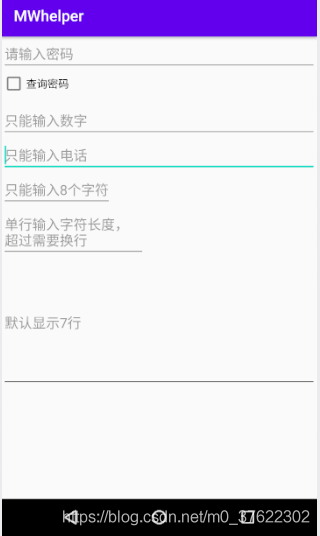
<LinearLayout xmlns:android="http://schemas.android.com/apk/res/android"android:orientation="vertical" android:layout_width="match_parent"android:layout_height="match_parent"><EditTextandroid:id="@+id/edit_layout_password"android:layout_width="match_parent"android:layout_height="wrap_content"android:hint="请输入密码"android:inputType="textPassword"></EditText><CheckBoxandroid:id="@+id/edit_layout_showPassword"android:layout_width="wrap_content"android:layout_height="wrap_content"android:text="查询密码"></CheckBox><EditTextandroid:layout_marginTop="10dp"android:layout_width="match_parent"android:layout_height="wrap_content"android:inputType="number"android:hint="只能输入数字"></EditText><EditTextandroid:id="@+id/edit_layout_phone"android:layout_width="match_parent"android:layout_height="wrap_content"android:inputType="phone"android:hint="只能输入电话"></EditText><EditTextandroid:layout_width="wrap_content"android:layout_height="wrap_content"android:maxLength="8"android:hint="只能输入8个字符"></EditText><EditTextandroid:layout_width="wrap_content"android:layout_height="wrap_content"android:ems="9"android:hint="单行输入字符长度,超过需要换行"></EditText><EditTextandroid:layout_width="match_parent"android:layout_height="wrap_content"android:minLines="7"android:hint="默认显示7行"></EditText></LinearLayout>
这篇关于android控件EditView常用案例-密码明文查看的文章就介绍到这儿,希望我们推荐的文章对编程师们有所帮助!