本文主要是介绍CloudFoundry in 1 Box简介:Lattice篇,希望对大家解决编程问题提供一定的参考价值,需要的开发者们随着小编来一起学习吧!
Pivotal Web Service主管工程师 产品经理 吴疆
本篇是《CloudFoundry in 1 Box简介》系列最后一篇,在前面两篇中,我们介绍了Bosh-lite和pcf-dev的架构和部署。在本篇中,我们将详细描述另一个CloudFoundry in 1 Box解决方案Lattice。
1. Lattice简介
Lattice是一个很有意思的项目,设计目标是为Cloud Foundry的开发人员提供一个最小的App运行时环境,所以它只选择了Cloud Foundry中与App运行相关的组件,从而组成了一个最简化的开发测试Cloud Foundry App的环境。
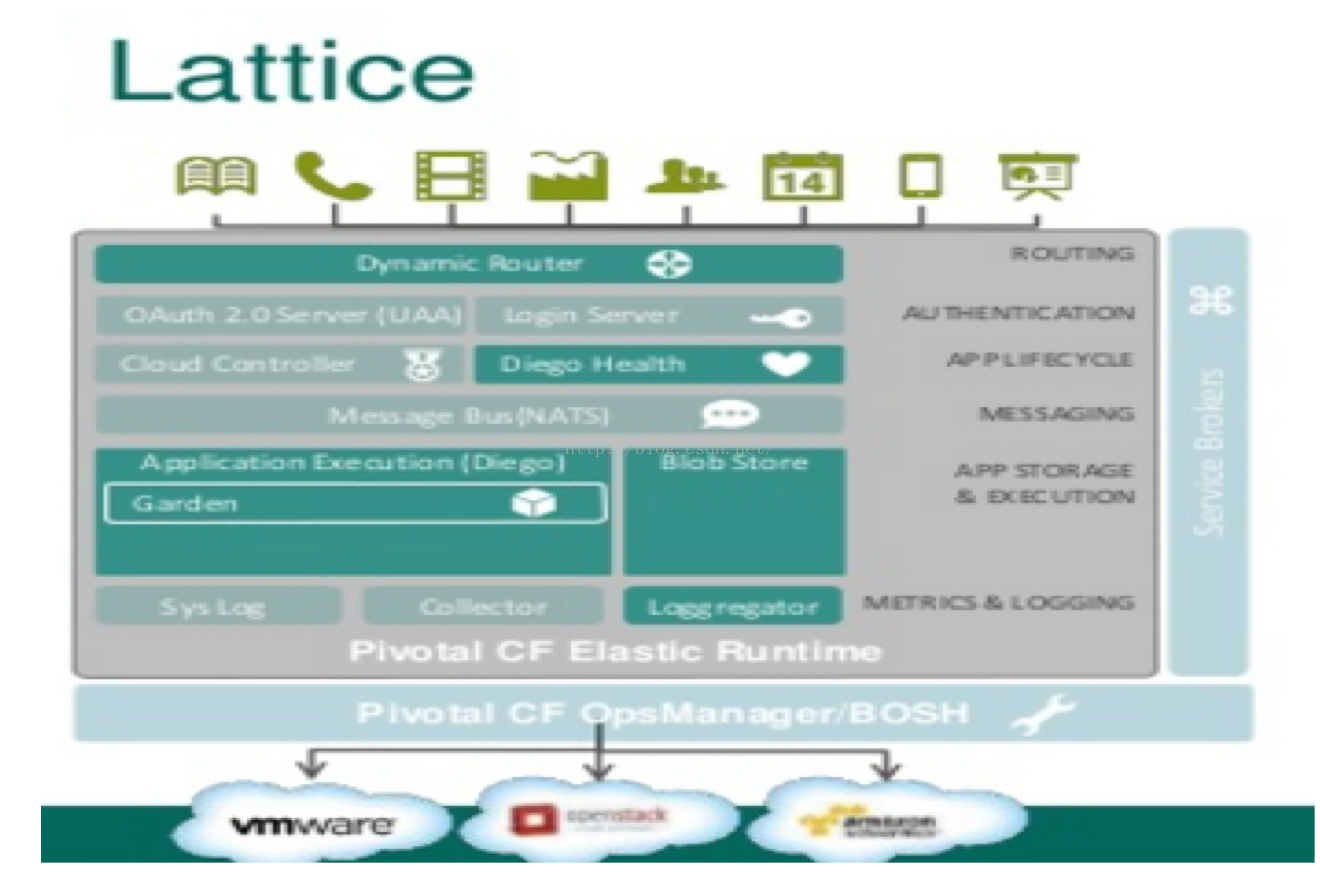
如上图所示,Lattice仅包含如下组件
-
Router:负责访问App请求的routing
-
Diego:Cloud Foundry App的运行时环境
-
Blob store: App staging的存储空间
-
loggregator:log服务器,供app开发者查看app运行时日志
笔者采用的事Cent OS 7.2作为宿主机的操作系统,VirtualBox为虚拟机平台
2.1 安装以来的软件包
# rpm -Uvh http://mirror.pnl.gov/epel/7/x86_64/e/epel-release-7-5.noarch.rpm
# yum install -y vim git screen kernel* libX11 qt SDL SDL-devel libxml2-devel \libvpx libpng libXt libXmu libxslt libxslt-devel openssl \ openssl-devel libXcursor libXinerama qt qt-devel wget gcc unzip ntpdate net-tools
2.2 安装Ruby环境
笔者使用rbenv来安装和管理ruby
# git clone git://github.com/sstephenson/rbenv.git $HOME/.rbenv
# git clone https://github.com/sstephenson/ruby-build.git $HOME/.rbenv/plugins/ruby-build
# echo 'export PATH="$HOME/.rbenv/bin:$PATH"' >> ~/.bash_profile
# echo 'eval "$(rbenv init -)"' >> ~/.bash_profile
# source ~/.bash_profile
# rbenv install 2.3.0
# rbenv global 2.1.3
# gem install bundle
# gem install nokogiri — --use-system-libraries
2.3安装Vagrant
# wget https://releases.hashicorp.com/vagrant/1.8.1/vagrant_1.8.1_x86_64.rpm
# rpm -Uvh vagrant_1.8.1_x86_64.rpm# vagrant --version
Vagrant 1.8.1# wget http://download.virtualbox.org/virtualbox/5.0.16/VirtualBox-5.0-5.0.16_105871_el7-1.x86_64.rpm
# #安装virtualbox时需要linux kernel的源代码,设置KERN_DIR环境变量指示kernel源代码路径
# export KERN_DIR=/usr/src/kernels/<your kernel dir>
# rpm -Uvh VirtualBox-5.0-5.0.16_105871_el7-1.x86_64.rpm验证virtualbox是否安装成功
# VBoxManage --version
5.0.16r105871
3. 部署Lattice
# wget https://github.com/cloudfoundry-incubator/lattice-release/releases/latest# gunzip lattice-bundle-<version>.zip# cd <lattice>/vagrant
# vagrant up --provider=virtualbox# cd <lattice>/vagrant
# vagrant ssh ##登陆pcf-dev虚拟机# 登陆之后的pcf-dev虚拟机
$ sudo -i
# monit summary
root@agent-id-pcfdev-0:~# monit summary
The Monit daemon 5.2.4 uptime: 17mProcess 'auctioneer' running
Process 'receptor' running
Process 'bbs' running
Process 'converger' running
Process 'file_server' running
Process 'route_emitter' running
Process 'ssh_proxy' running
Process 'rep' running
Process 'rootfses' running
Process 'garden' running
File 'haproxy_config' accessible
Process 'haproxy' running
Process 'router_configurer' running
Process 'tcp_emitter' running
Process 'routing-api' running
Process 'consul_agent' running
Process 'doppler' running
Process 'gorouter' running
Process 'loggregator_trafficcontroller' running
Process 'metron_agent' running
Process 'nats' running
Process 'route_registrar' running
Process 'etcd' running
System 'system_lattice-colocated-0' running
如果设有http/https proxy,需要执行如下步骤
export no_proxy=192.168.11.11,local.lattice.cf# curl -O http://receptor.local.lattice.cf/v1/sync/linux/ltc
# chmod +x ltcLattice默认的域名为local.lattice.cf, *.local.lattice.cf会被解析到192.168.11.11
# ping xyz.local.lattice.cf
PING xyz.local.pcfdev.io (192.168.11.11) 56(84) bytes of data.
64 bytes from 192.168.11.11: icmp_seq=1 ttl=64 time=0.818 ms
64 bytes from 192.168.11.11: icmp_seq=2 ttl=64 time=1.45 ms
64 bytes from 192.168.11.11: icmp_seq=3 ttl=64 time=1.33 ms
64 bytes from 192.168.11.11: icmp_seq=4 ttl=64 time=1.69 ms
64 bytes from 192.168.11.11: icmp_seq=5 ttl=64 time=1.25 ms
^C
--- xyz.local.pcfdev.io ping statistics ---
5 packets transmitted, 5 received, 0% packet loss, time 4006ms
rtt min/avg/max/mdev = 0.818/1.311/1.696/0.292 ms
# lattice target local.pcfdev.io
API location set.4.3 部署App
因为lattice环境仅包含运行Cloud Foundry App的最小环境,不包含任何buildpack,所以使用Lattice运行Cloud Foundry App需要两个步骤
1. build Cloud Foundry droplet,在这个步骤中,需要显示指定buildpack,以ruby app为例
# ltc build-droplet helloruby https://github.com/cloudfoundry/ruby-buildpack
Uploading application bits...
Uploaded.
Submitted build of helloruby
04/20 22:30:00.57 [BUILD|0] Successfully created container
04/20 22:30:06.20 [DROPLET|0] Deleted http://local.lattice.cf:8444/blobs/helloruby-bits.zip.
04/20 22:30:06.22 [DROPLET|0] Exit status 0
04/20 22:30:06.39 [BUILD|0] Exit status 0
04/20 22:30:27.50 [BUILD|0] -------> Buildpack version 1.6.16
04/20 22:30:27.68 [BUILD|0]        Downloaded [https://pivotal-buildpacks.s3.amazonaws.com/ruby/binaries/shared/bundler-1.11.2.tgz]
04/20 22:30:31.68 [BUILD|0] -----> Compiling Ruby/Rack
04/20 22:30:32.38 [BUILD|0]        Downloaded [https://pivotal-buildpacks.s3.amazonaws.com/concourse-binaries/ruby/ruby-2.3.0-linux-x64.tgz]
04/20 22:31:07.03 [BUILD|0] -----> Using Ruby version: ruby-2.3.0
04/20 22:31:07.48 [BUILD|0] ###### WARNING:
04/20 22:31:07.48 [BUILD|0]        remove the `.bundle/` folder from your repo and add it to your `.gitignore` file.
04/20 22:31:07.48 [BUILD|0]        You have the `.bundle/config` file checked into your repository
04/20 22:31:07.48 [BUILD|0]        https://devcenter.heroku.com/articles/bundler-configuration
04/20 22:31:07.48 [BUILD|0]        It contains local state like the location of the installed bundle
04/20 22:31:07.48 [BUILD|0]        as well as configured git local gems, and other settings that should
04/20 22:31:07.48 [BUILD|0] -----> Installing dependencies using bundler 1.11.2
04/20 22:31:07.48 [BUILD|0]        not be shared between multiple checkouts of a single repo. Please
04/20 22:31:08.27 [BUILD|0]        Downloaded [https://pivotal-buildpacks.s3.amazonaws.com/ruby/binaries/cflinuxfs2/libyaml-0.1.6.tgz]
04/20 22:31:11.03 [BUILD|0]        Running: bundle install --without development:test --path vendor/bundle --binstubs vendor/bundle/bin -j4 --deployment
04/20 22:31:14.33 [BUILD|0]        Fetching gem metadata from https://ruby.taobao.org/....
04/20 22:31:14.63 [BUILD|0]        Fetching version metadata from https://ruby.taobao.org/..
04/20 22:31:15.49 [BUILD|0]        Installing kgio 2.9.2 with native extensions
04/20 22:31:15.63 [BUILD|0]        Installing rake 10.4.2
04/20 22:31:15.82 [BUILD|0]        Installing rack 1.6.0
04/20 22:31:17.23 [BUILD|0]        Installing raindrops 0.13.0 with native extensions
04/20 22:31:17.40 [BUILD|0]        Installing rdiscount 2.1.7.1 with native extensions
04/20 22:31:54.47 [BUILD|0]        Installing tilt 1.4.1
04/20 22:31:54.77 [BUILD|0]        Using bundler 1.11.2
04/20 22:31:55.19 [BUILD|0]        Installing rack-protection 1.5.3
04/20 22:31:56.16 [BUILD|0]        Installing sinatra 1.4.5
04/20 22:32:38.00 [BUILD|0]        Bundle complete! 7 Gemfile dependencies, 10 gems now installed.
04/20 22:32:38.00 [BUILD|0]        Gems in the groups development and test were not installed.
04/20 22:32:38.00 [BUILD|0]        Bundled gems are installed into ./vendor/bundle.
04/20 22:32:38.04 [BUILD|0]        Bundle completed (87.00s)
04/20 22:32:38.06 [BUILD|0]        Cleaning up the bundler cache.
04/20 22:32:40.00 [BUILD|0] -----> Writing config/database.yml to read from DATABASE_URL
04/20 22:32:41.31 [BUILD|0] ###### WARNING:
04/20 22:32:41.31 [BUILD|0]        You have the `.bundle/config` file checked into your repository
04/20 22:32:41.31 [BUILD|0]        It contains local state like the location of the installed bundle
04/20 22:32:41.31 [BUILD|0]        as well as configured git local gems, and other settings that should
04/20 22:32:41.31 [BUILD|0]        not be shared between multiple checkouts of a single repo. Please
04/20 22:32:41.31 [BUILD|0]        remove the `.bundle/` folder from your repo and add it to your `.gitignore` file.
04/20 22:32:41.31 [BUILD|0]        https://devcenter.heroku.com/articles/bundler-configuration
04/20 22:32:58.50 [BUILD|0] Exit status 0
04/20 22:32:59.45 [DROPLET|0] Uploaded /tmp/droplet to http://local.lattice.cf:8444/blobs/helloruby-droplet.tgz.
04/20 22:32:59.49 [DROPLET|0] Exit status 0# tc list-droplets
Droplet        Created At        Size
helloruby 04/20 14:32:59.00 20.3M# ltc launch-droplet helloruby helloruby
No port specified. Defaulting to 8080.
Creating App: helloruby
.04/20 22:37:00.15 [APP|0] Creating container
.04/20 22:37:01.77 [APP|0] Successfully created container
..............04/20 22:37:16.10 [HEALTH|0] healthcheck failed
04/20 22:37:16.14 [HEALTH|0] Exit status 1
04/20 22:37:16.56 [SSH|0] {"timestamp":"1461163036.562246799","source":"sshd","message":"sshd.started","log_level":1,"data":{}}
04/20 22:37:16.81 [HEALTH|0] healthcheck failed
04/20 22:37:16.83 [HEALTH|0] Exit status 1
.04/20 22:37:17.54 [HEALTH|0] healthcheck failed
04/20 22:37:17.57 [HEALTH|0] Exit status 1
.04/20 22:37:18.04 [APP|0] I, [2016-04-20T14:37:18.041860 #10] INFO -- : Refreshing Gem list
04/20 22:37:18.26 [APP|0] I, [2016-04-20T14:37:18.253960 #10] INFO -- : listening on addr=0.0.0.0:8080 fd=9
04/20 22:37:18.27 [APP|0] I, [2016-04-20T14:37:18.266758 #10] INFO -- : master process ready
04/20 22:37:18.27 [HEALTH|0] healthcheck passed
04/20 22:37:18.31 [APP|0] I, [2016-04-20T14:37:18.280764 #43] INFO -- : worker=0 ready
04/20 22:37:18.32 [APP|0] I, [2016-04-20T14:37:18.284959 #49] INFO -- : worker=2 ready
04/20 22:37:18.33 [APP|0] I, [2016-04-20T14:37:18.305195 #46] INFO -- : worker=1 ready
04/20 22:37:18.35 [HEALTH|0] Exit status 0helloruby is now running.
App is reachable at:
http://helloruby.local.lattice.cf
http://helloruby-8080.local.lattice.cfRuby App启动成功,可以通过http://helloruby.local.lattice.cf访问应用
这篇关于CloudFoundry in 1 Box简介:Lattice篇的文章就介绍到这儿,希望我们推荐的文章对编程师们有所帮助!