本文主要是介绍CSS Fonts,希望对大家解决编程问题提供一定的参考价值,需要的开发者们随着小编来一起学习吧!
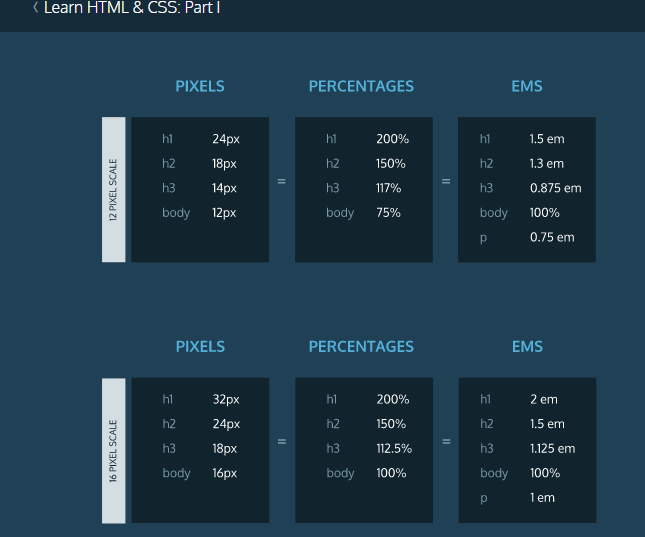

代码示例(完整版):
index.html
<!DOCTYPE html>
<html>
<head><title>The Rise of Soccer in The US</title><link href="https://fonts.googleapis.com/css?family=Roboto:100" type="text/css" rel="stylesheet"><link href="https://fonts.googleapis.com/css?family=Playfair+Display" type="text/css" rel="stylesheet"><link href="style.css" type="text/css" rel="stylesheet">
</head>
<body><div class="content"><img src="https://s3.amazonaws.com/codecademy-content/courses/web-101/unit-4/htmlcss1-img_writer-avatar.jpg" class="writer-img"><h3 class="byline">Article By: Jane Dover</h3><h1>How the Rise of Soccer in the US Is Changing the Face of Youth Sports</h1><h2>The focus on soccer in youth sports programs is exploding nation-wide</h2><p>When the first World Cup arrived in the US in the 90's everyone officially declared that soccer was it. Well it's taken it's time but we can definitely see the influence of soccer, especially women's soccer, across the US. This year, 3 million kids played in youth soccer leagues with 2/3 of those leagues for girls. In fact, in the 12-17 age range the MLS has surpassed the MLB and NFL in popularity.</p><p>Part of this meteoric rise can be attributed to the impressively soaring ad dollars being pumped into the Women's World Cup games in 2014. The women's games generated $40 million for Fox, that's definitely not chump change. And those advertisers, like ATT, Coca Cola, Verizon, Nike, Visa, and other heavy hitters, are working to make sure they see those numbers grow year after year by investing in youth soccer facilities and promoting programs across the country. </p><p>Now that big business is involved you can be assured you'll see a continued rise in popularity in soccer across the country for years to come. </p></div><div class="image"><p class="caption">The local semi- pro soccer team in Seattle, WA plays an international friendly</p></div></body>
</html>style.css
body {/* Old browsers */background: #141E30;/* Chrome 10-25, Safari 5.1-6 */background: -webkit-linear-gradient(-45deg, #35577D, #141E30);/* W3C, IE 10+/ Edge, Firefox 16+, Chrome 26+, Opera 12+, Safari 7+ */background: linear-gradient(-45deg, #35577D, #141E30);margin: 0;padding: 0;
}h1 {color: #FFF;font-family:Playfair Display,serif;font-size: 32px;padding-top: 100px;text-align: left;width: 60%;text-transform:uppercase;
}h2 {border-bottom: 1px solid rgba(255, 255, 255, 0.5);color: rgba(255, 255, 255, 0.5);font-family:Roboto,sans-serif;font-weight: 100;font-size: 22px;font-style:italic;line-height: 24px;word-spacing:0.05em;letter-spacing:0.02em;padding-bottom: 30px;text-align: left;width: 70%;
}p {color: AliceBlue;font-family:Roboto,sans-serif;font-size:20px;line-height: 1.7em;font-weight:100;text-align: left;width: 100%;
}.byline {color: rgba(255, 255, 255, 0.5);float: left;font-family: 'Roboto', sans-serif;font-weight: 100;font-size: 14px;padding-left: 10px;text-transform: uppercase;
}.caption {background-color: rgba(0, 0, 0, 0.6);color: rgba(255, 255, 255, 0.65);display: block;font-family: 'Playfair Display', serif;font-size: 14px;font-style: italic;line-height: 14px;margin-left: 20px;padding: 10px;position: relative;top: 80%;width: 60%;
}.content {padding: 40px;
}.image {background-image: url("https://s3.amazonaws.com/codecademy-content/courses/web-101/unit-4/htmlcss1-img_soccer.jpeg");background-size: cover;background-position: center;height: 300px;
}.writer-img {-webkit-box-shadow: 5px 0px 5px 0px rgba(0, 0, 50, 0.97);-moz-box-shadow: 5px 0px 5px 0px rgba(0, 0, 50, 0.97);box-shadow: 5px 0px 5px 0px rgba(0, 0, 50, 0.97);float: left;width: 50px;
}
这篇关于CSS Fonts的文章就介绍到这儿,希望我们推荐的文章对编程师们有所帮助!





